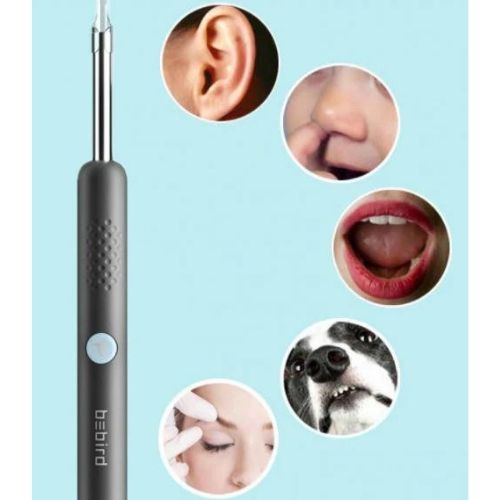
he Smart Visual Earwax Remover is a high-definition personal care system designed to replace the guesswork of traditional cotton swabs with clinical-level visibility. By integrating a micro-camera with wireless synchronization, this device allows you to navigate the ear canal with precision and safety. Instead of pushing debris deeper, you can now monitor the cleaning process in real-time on your smartphone, ensuring a thorough yet gentle experience that prioritizes your long-term hearing health.
Key Performance Features
Is it right for you?
Best for: Individuals prone to earwax buildup, parents who want to safely inspect their children’s ears, and anyone looking for a modern, tech-driven upgrade to their hygiene routine.
Keep in mind: While the HD camera provides incredible detail, it is important to move the device slowly and steadily. The device is designed for surface-level and mid-canal cleaning; always maintain a safe distance from the eardrum. To keep the lens clear, a quick wipe with an alcohol swab after each use will ensure your video stream remains sharp.
Pro Tip: For the clearest video feed, start on the lowest brightness setting and gradually increase it until the earwax is clearly visible without "washing out" the image. If the lens becomes blurry, it is likely just a small amount of oil—simply cleaning the tip will instantly restore your 1080p clarity
Safety First: Your 3-Step Start Guide
Before you begin, ensure your device is fully charged and the tip is securely attached. Follow these steps for a safe and successful cleaning session:
Step 1: The "Calibration" Check
Before entering the ear canal, open the app and look at the screen while moving the device in the air.
Step 2: The "Anchor" Technique
Never hold the device freely in the air while it’s in your ear.
-
The Method: Rest your hand firmly against your cheek or jawbone as you hold the device (similar to how you might apply eyeliner).
-
Why? This "anchors" your hand, preventing accidental deep pokes if you happen to sneeze, jump, or lose your balance.
Step 3: The "Slow-Motion" Entry
Gently pull your outer ear upward and backward with your free hand to straighten the ear canal.
-
The Method: Insert the tip slowly, watching the screen the entire time. Stop immediately if you feel any discomfort or resistance.
-
The Goal: Focus on cleaning the outer and middle areas of the canal. There is no need to get close to the eardrum—the HD zoom allows you to see everything you need from a safe distance.
Quick Sanitization Tip
After every session, remove the silicone tip and clean both the tip and the camera lens with a 70% Isopropyl Alcohol swab. This prevents wax buildup on the lens and ensures your next "live stream" is perfectly clear.